













00Hours
00Minutes
00Seconds

ENDING SOON: SAVE 20% ON YOUR FIRST VPS INVOICE

Menu

The Best VPS For TradingView Traders

Access TradingView from anywhere with lightning-fast performance. Perfect for advanced charting, Pine Script strategies, and 24/7 automated trading. Every plan backed by a 14-day money-back guarantee.

  • Sub-millisecond latency for webhook execution
  • Run TradingView alerts and automations 24/7
  • TradingView pre-installed — chart and trade instantly
  • Full Windows VPS with Python and webhook support
  • 100% uptime guarantee with service monitoring
TradingView
Trade Faster With 1ms Latency

Compatible with TradingView & All Brokers

IC Markets logo
IC Markets
Pepperstone logo
Pepperstone
Axi logo
Axi
BlackBull Markets logo
BlackBull Markets
FP Markets logo
FP Markets
Exness logo
Exness
TitanFX logo
TitanFX
FTMO logo
FTMO
XM logo
XM
Tickmill logo
Tickmill
Eightcap logo
Eightcap
AvaTrade logo
AvaTrade

Our TradingView VPS delivers blazing-fast performance, ensuring your charts load instantly and your trades execute without delay.

TradingView VPS Plans

Simple, transparent pricing for TradingView traders. Risk Free - 14 Day Full Refund Policy Included.

Basic VPS

Best For:1-2 Trading Accounts
$20.83/month
Save 20%
$16.67
$200 Billed Yearly
Instant Setup - Ready In 30 Seconds

Pre-Installed With Your Platforms & Brokers

MetaTrader 4
MetaTrader 5
cTrader
TradingView
ICMarkets
Pepperstone
FTMO

100+ Brokers & Platforms Available

Locations
NY4, LD4, TY3
Latency
~1ms or less to most brokers
Processor(Powered by)
2 CPU Cores
RAM
2 GB DDR5
Storage
60 GB NVMe
Operating System
Windows Server 2022
Uptime
100% Guarantee

Standard VPS

Best For:3-6 Trading Accounts
$33.33/month
Save 20%
$26.67
$320 Billed Yearly
Instant Setup - Ready In 30 Seconds

Pre-Installed With Your Platforms & Brokers

MetaTrader 4
MetaTrader 5
cTrader
TradingView
ICMarkets
Pepperstone
FTMO

100+ Brokers & Platforms Available

Locations
NY4, LD4, TY3
Latency
~1ms or less to most brokers
Processor(Powered by)
2 CPU Cores
RAM
4 GB DDR5
Storage
70 GB NVMe
Operating System
Windows Server 2022
Uptime
100% Guarantee

Professional VPS

Best For:7-8 Trading Accounts
$50/month
Save 20%
$40
$480 Billed Yearly
Instant Setup - Ready In 30 Seconds

Pre-Installed With Your Platforms & Brokers

MetaTrader 4
MetaTrader 5
cTrader
TradingView
ICMarkets
Pepperstone
FTMO

100+ Brokers & Platforms Available

Locations
NY4, LD4, TY3
Latency
~1ms or less to most brokers
Processor(Powered by)
4 CPU Cores
RAM
8 GB DDR5
Storage
100 GB NVMe
Operating System
Windows Server 2022
Uptime
100% Guarantee

Dedicated Server

Best For:9+ Trading Accounts
$93.75/month
$1125 Billed Yearly
In Stock - Ready The Same Day

Pre-Installed With Your Platforms & Brokers

MetaTrader 4
MetaTrader 5
cTrader
TradingView
ICMarkets
Pepperstone
FTMO

100+ Brokers & Platforms Available

Locations
NY4, LD4, TY3
Latency
~1ms or less to most brokers
Processor(Powered by)
AMD / Intel 4+ Cores
RAM
16+ GB DDR5
Storage
500+ GB NVMe
Operating System
Windows Server 2022
Uptime
100% Guarantee
Need Help Choosing The Right Plan?

The Most Advanced VPS Platform

Explore our comprehensive platform features designed specifically for professional forex traders. Each capability is engineered to give you the competitive edge you need.

Web Browser Access

Access your VPS from anywhere with secure browser-based remote desktop.

One Click Install

Install your broker's MT4, MT5, cTrader instantly with one click.

Upload EA & Data

Seamlessly transfer Expert Advisors, indicators, and trading data.

Firewall & Security

Keep your trading VPS safe at all times with extensive security settings.

Remote Power Control

Reboot and manage your VPS's power remotely from your web browser.

Automated Backups

Keep your VPS data safe and secure with regular automated backups.

Change Windows Language

Adjust the Windows language on your VPS with the click of a button.

Resource & Platform Monitoring

Monitor your VPS's resources and running trading platforms with alerts enabled.

VPS Features Every
TradingView Trader Needs

Powered By Enterprise Hardware

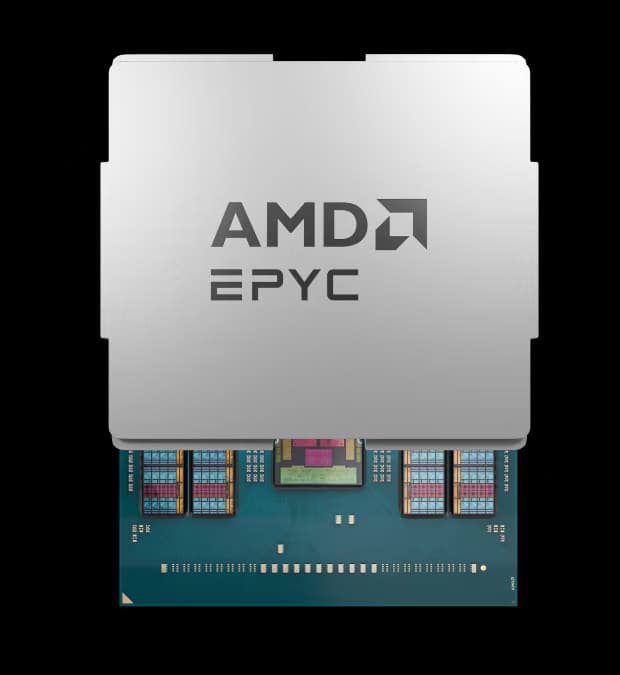
TradingViewVPS - Powered By AMD

Experience unmatched computational power with our AMD EPYC-powered infrastructure. These enterprise-grade processors deliver superior performance, efficiency, and reliability for demanding TradingView trading workloads.

  • Latest generation AMD EPYC processors for maximum performance
  • Enterprise-grade hardware reliability and stability
  • Optimized for high-frequency trading applications
AMD EPYC CPU
Lock In Profits

Execute PineScript & Trades Instantly

By using our TradingView VPS your trades will be filled instantly by your broker. Say goodbye to slippage and unexpected trade entries/exits

NYCServers VPS

Latency: 1ms
Trade Price:1.08452

Home Connection

Latency: 100+ms
Trade Price:1.08452
Peak Performance

Perfect TradingView Performance

By using a TradingView VPS your platform will remain running perfectly during all market conditions - even during the most volatile news releases and events

Release
Country
Event
Actual
Est.
Previous
Impact
Mar 03 06:00
🇺🇸
Federal Funds Rate
4.25
4.50
4.75
Mar 03 06:30
🇺🇸
FOMC Press Conference
-
-
-
Mar 03 07:00
🇬🇧
Official Bank Rate
-
-
-
Mar 03 07:30
🇺🇸
-
-
-
All Systems Operational
NYCServers VPS
System Freeze
Slow Computer
Unmatched Support

24/7 Expert TradingView Support

Rest easy knowing that our support team is available around the clock to provide fast and efficient support for all things related to your TradingView VPS

New Support Ticket

How can I reset my VPS password?

0:00

Real 24x7 Technical Support

Trusted by Traders
Since 2012

Featured reviews from 534+ happy traders who've run their strategies on our Forex VPS

Frequently Asked Questions

Everything you need to know about our TradingView VPS services

General

What is a TradingView VPS?
A TradingView VPS is a virtual private server optimized for running TradingView and connected trading tools around the clock. Your browser-based platform and any automation tools stay online 24/7 in a professional datacenter, so your alerts, webhooks, and automated strategies execute reliably—even when your home computer is off.
Why use a VPS for TradingView?
While TradingView runs in the cloud, many traders connect it to external automation tools, webhook receivers, or broker APIs that require a dedicated server. A VPS keeps these connections running 24/7 without interruption and provides a stable environment for executing trades triggered by TradingView alerts.
How does TradingView automation work on a VPS?
TradingView sends alerts via webhooks to external services or scripts running on your VPS. These can trigger trades through broker APIs, send notifications, or execute custom automation workflows. The VPS ensures your webhook receiver is always online and ready to act on alerts instantly.
Is TradingView pre-installed on the VPS?
Yes. Your VPS comes with a browser and TradingView bookmarked and ready to use. We can also pre-install common automation tools like PineConnector, TradingView-to-MT4/MT5 bridges, or custom webhook receivers upon request.
Can I run TradingView alongside MetaTrader or cTrader?
Absolutely. Many traders use TradingView for charting and alerts while executing trades through MT4, MT5, or cTrader. Running everything on one VPS keeps your entire workflow connected and eliminates latency between platforms.
Do I need a TradingView paid plan to use it on a VPS?
TradingView's free plan works on a VPS, but paid plans (Essential, Plus, Premium) unlock more alerts, indicators, and charts. If you're running multiple alert-based strategies, a paid TradingView subscription is recommended.
What can I automate with TradingView on a VPS?

Common automations include:

  • Executing trades via webhooks when alerts fire
  • Sending notifications to Telegram or Discord
  • Logging trade signals to spreadsheets
  • Running Pine Script strategies with auto-execution through third-party connectors
  • Managing multi-broker portfolios from TradingView signals

Technical

What latency can I expect?
From our NY4 Equinix datacenter, connections to major broker APIs and webhook endpoints see sub-1ms to single-digit millisecond latency. This ensures your TradingView alerts trigger trade execution with minimal delay.
How do TradingView webhooks work with the VPS?
You set up a webhook URL pointing to a script or service running on your VPS. When a TradingView alert fires, it sends a POST request to that URL. Your VPS receives it instantly and executes whatever action you've configured—placing a trade, sending a message, or running custom logic.
What tools can I use to connect TradingView to my broker?

Popular options include:

  • PineConnector for MT4/MT5
  • TradingView alerts to cTrader via webhooks
  • Custom Python scripts using broker APIs
  • Third-party services like 3Commas or Alertatron

We can pre-install any of these on your VPS.

How many TradingView tabs can I run on one VPS?

It depends on your plan and browser memory usage. As a general guide:

  • Basic plans handle 3-5 tabs comfortably
  • Standard plans handle 6-10
  • Professional plans handle 12+

Using a lightweight browser and limiting indicators per chart helps maximize capacity.

Can I run Pine Script strategies 24/7?
Pine Script strategies run within TradingView's cloud, but alert-based execution requires your webhook receiver to be online. The VPS ensures your automation endpoint is always available to receive and act on signals from your Pine Script strategies.
How do I connect to my VPS after ordering?
You'll receive Remote Desktop login credentials via email. On Windows, use the built-in Remote Desktop Connection app. On Mac, download Microsoft Remote Desktop from the App Store. Enter your VPS IP address and credentials to connect.
Can I access my VPS from a phone or tablet?
Yes. Use any Remote Desktop app on iPhone or Android to connect directly to your VPS. You can check your TradingView charts, monitor automation logs, or make quick adjustments from anywhere.
Do I get full administrator access?
Yes. All VPS plans include full Windows administrator access, so you can install software, configure webhook receivers, and customize your environment however you need.
Can I run Python scripts for TradingView automation?
Yes. Python is commonly used to build webhook receivers and broker API integrations. We can pre-install Python and common libraries like ccxt, requests, and flask on your VPS upon request.
What happens if my VPS restarts unexpectedly?
Our monitoring system detects restarts and can automatically relaunch your browser and automation tools. You'll also receive an alert notification so you're always aware of what's happening with your trading environment.
Which browsers work best for TradingView on a VPS?
Chrome and Edge both work well. For lower memory usage, Brave or a lightweight Chromium-based browser can help if you're running many tabs. We recommend keeping unnecessary extensions disabled to maximize performance.

Billing

How fast is the setup?
Instant. After payment is confirmed, you'll receive your login credentials within minutes. Your VPS comes ready with a browser and TradingView accessible immediately—no waiting for manual provisioning.
What payment methods do you accept?
We accept PayPal, all major credit and debit cards, and cryptocurrency including Bitcoin, Ethereum, and USDT.
Is there a refund policy?
Yes. All VPS plans include a 14-day full refund policy. If you're not satisfied for any reason, contact support for a complete refund. The $1 trial is excluded from this policy.
Can I upgrade my plan later?
Yes. You can upgrade to a higher-tier plan at any time from your client dashboard. Your existing setup and automation scripts will be migrated to the new server.
Do you offer a trial?
Yes. We offer a $1 trial so you can test our VPS performance with your TradingView setup before committing to a full plan.

Affiliates

How does the affiliate program work?
Refer traders to NYCServers using your unique affiliate link. When someone signs up through your link, you earn a recurring commission for as long as they remain a customer.
How are affiliate commissions paid?
Commissions are paid via PayPal, cryptocurrency, or account credit which you can use toward your own VPS service.
What is the minimum payout amount?
You can withdraw your commissions once your balance reaches $50.
I have a large audience. Can I get a custom commission rate?

Yes. We offer enhanced commission rates for content creators, trading educators, and businesses with significant reach.

Contact us to discuss a custom arrangement.

Still Have Questions?
Visit our knowledgebase or reach out to our 24/7 support team

Finally, A Forex VPS
That

Join 10,000+ traders who already upgraded to smarter, faster trading with our Forex VPS service.